We helped 75+ brands generate $1.56M+ in revenue. Average ROI: 240% in Year 1
without buying or calling.
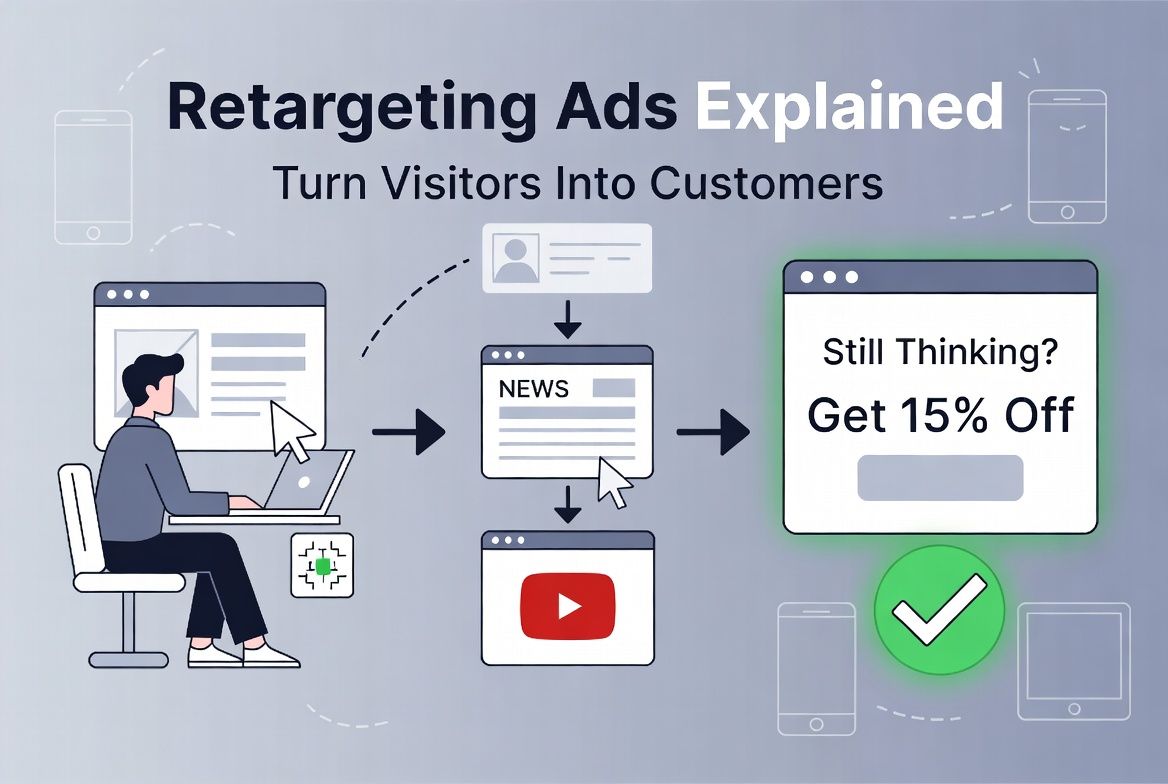
Then for the next week, that business's ads follow you around the internet — on news websites, on Instagram, on YouTube. Every platform you visit, there they are.
That is retargeting. And what looks like coincidence or even mild creepiness is actually one of the most cost-effective advertising strategies available to small businesses — because you are spending money specifically on the people who have already shown interest in what you offer.
Retargeting ads convert at 3–5x the rate of regular display ads and typically cost 40–60% less per conversion than cold-audience campaigns. This guide explains exactly how they work and how your small business can use them.
When someone visits your website, a small piece of code called a tracking pixel (installed on your site by Google or Meta) places a cookie in their browser. This cookie identifies them as someone who visited your site.
When that same person later visits another website that shows Google Display ads or Meta ads, the advertising platform checks: does this person have your retargeting cookie? If yes, show them your ad. If no, skip them.
The result: your ads are shown only to people who have already been to your website — a self-selected audience of warm prospects who had enough interest to click through but did not convert on the first visit. The technical term for this process in Google Ads is Remarketing. On Meta, it is Custom Audiences. Both do the same thing — follow warm prospects with relevant ads after they leave your site.
At AheadTech360, retargeting is one of the first things we recommend adding to any existing paid ads campaign. The reason is straightforward: most businesses already have website traffic — people arriving from Google organic search, social media, or existing ads — and most of those people leave without converting. Retargeting captures value from traffic you have already paid to acquire, instead of letting it walk away permanently. It is the highest-ROI addition to most small business ad strategies.
The data consistently shows retargeting outperforms cold-audience advertising on almost every metric:
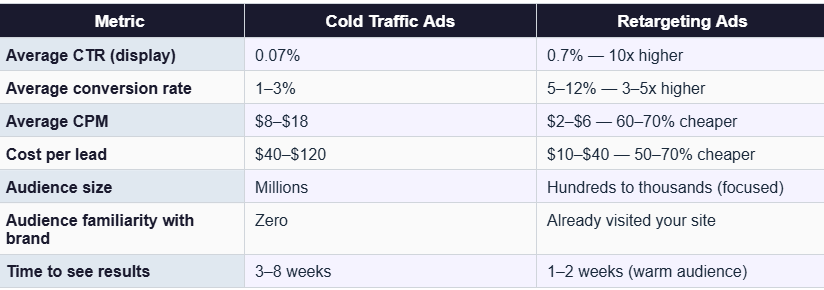
The reason for this gap is psychological: a person seeing your retargeting ad already knows your brand exists. They had enough interest to visit your site once. The second or third exposure to your ad is reinforcement, not introduction — and conversion psychology is dramatically different when someone already has context.
Site Retargeting — The most common type. Retargets anyone who visited any page on your website, or specific pages (like your pricing page, contact page, or service pages). You can also segment by time — someone who visited yesterday is higher intent than someone who visited 90 days ago. Typically the highest-converting retargeting audience for most businesses.
Engagement Retargeting — Retargets people who engaged with your social media content — watched your videos, liked your posts, visited your Instagram profile, or clicked your Facebook ads without converting. Available on Meta Ads. Lower intent than website visitors but broader reach, especially useful for newer businesses with limited website traffic.
Customer List Retargeting — Upload your existing customer email list to Google or Meta and they will match those emails to platform profiles. Use this to run reactivation campaigns to past customers, upsell to current customers, or exclude your existing customers from cold-audience campaigns (so you do not waste budget showing acquisition ads to people who already buy from you).
Dynamic Retargeting — Shows automatically personalized ads featuring the specific products or services a visitor viewed on your site. The ad shows the exact item they looked at, with pricing, image, and a link back to that product. Primarily used by ecommerce businesses. Requires a product feed set up in Google Merchant Center or Meta Commerce Manager.
The most common retargeting mistake: retargeting everyone who visited your site for 180 days with the same generic ad. A person who bounced from your homepage 5 months ago is very different from someone who spent 4 minutes on your pricing page yesterday. Segment your retargeting audiences by recency (30-day visitors vs 90-day visitors) and by page depth (pricing page visitors vs homepage bouncers) and show different messages to each segment. Pricing page visitors in the last 30 days deserve a specific, urgent offer. Homepage bouncers from 60 days ago need a brand reminder.
Setting up retargeting for the first time involves three steps, regardless of which platform you use:
Google Ads retargeting requires the Google Ads Remarketing Tag (or Google Analytics 4 with audience sharing enabled). Meta retargeting requires the Meta Pixel. Both are small snippets of JavaScript code installed in the header of your website. On WordPress, you can install both through Google Tag Manager or a dedicated plugin. On Shopify, both are natively supported with a few clicks. Installation takes 15–30 minutes if you are comfortable with basic website admin. The pixel needs to be active on your site for at least 30 days before you have a large enough audience to launch a retargeting campaign.
Once your pixel is installed and collecting data, go into your Google Ads or Meta Ads Manager and create audience lists. For Google: Audience Manager → Website Visitors → create lists by URL (all visitors, pricing page visitors, contact page visitors). For Meta: Events Manager → Custom Audiences → Website → set your time window (30, 60, 90 days) and URL rules. The minimum audience size for a retargeting campaign is 100 users for Google Display and 1,000 users for Meta. If your site gets under 100 visitors per month, you need to build website traffic before retargeting makes sense.
Retargeting creative should be different from cold-audience creative. These people already know you — so you do not need to introduce yourself. Instead: reference that they visited your site, make a specific offer to bring them back, address the most common objection that stops visitors from converting, or use social proof (a testimonial or review) to increase trust. Example: instead of a generic service ad, a retargeting ad might say: 'Still thinking about it? Here is what our clients say — plus 15% off your first service this week only.'
Start with a single retargeting campaign targeting all website visitors from the last 30 days on Meta Ads (Facebook and Instagram). Allocate 20–25% of your total monthly ad budget to this campaign. Set the audience frequency cap to 3–5 times per week so you stay top of mind without becoming annoying. This single campaign — which requires about 2 hours to set up — typically generates the lowest cost-per-lead of any paid campaign you run, because you are talking to the warmest audience available to you.
Retargeting is not complicated — but it is dramatically underused by small businesses. The principle is simple: the people most likely to become your customers are the people who have already shown interest by visiting your website. Spending 20–25% of your ad budget specifically on this warm audience is one of the highest-ROI decisions in paid advertising.
Install the pixel today, even if you are not ready to run retargeting campaigns yet. Every day without a pixel is a day of lost data — website visitors who could have been in your retargeting audience but are now gone forever.
Do not let warm prospects go cold. Retargeting keeps your brand in front of the people who were most of the way there — and brings them back when they are ready.