We helped 75+ brands generate $1.56M+ in revenue. Average ROI: 240% in Year 1
This is the first question every small business owner asks before running Google Ads. And it almost always gets a frustrating non-answer: 'It depends.'
Yes, it depends. But on what, exactly? That's what this guide answers.
By the end, you'll know the real cost-per-click benchmarks for your industry, what three different monthly budgets realistically deliver in leads and revenue, the minimum viable budget to get results (and why spending below it almost always fails), and how to calculate the right budget for your specific business using a simple framework.
No vague ranges. No agency-speak. Real 2026 numbers that help you make an informed decision before you open your wallet.
At AheadTech360, the first thing we do before recommending any Google Ads budget is build a market-specific analysis — what are competitors bidding, what is the average CPC in this industry and location, and what does our client's close rate look like. This guide gives you the same framework we use internally.
Before we talk numbers, you need to understand the three things that determine what you actually pay:
The Auction — Every time someone searches on Google, an auction happens in milliseconds. Advertisers bid on keywords, and Google decides which ads to show and in what order. You don't pay your maximum bid — you pay just enough to beat the next advertiser below you. This means the same keyword can cost very different amounts depending on your competition.
Quality Score — Google rewards relevance. If your ad closely matches the search query and your landing page delivers on the ad's promise, Google gives you a higher Quality Score (1–10). A higher Quality Score means you pay less per click than a competitor with a lower score — even if they're bidding more. This is the small business advantage we covered in Blog 1: relevance beats budget.
Competition in Your Market — A plumber in a small Texas town might pay $2–$4 per click. The same plumber in Manhattan might pay $12–$18 per click for the same keyword. Location, industry, and the number of competing advertisers all directly impact your cost.
The result: there is no single answer to 'how much does Google Ads cost?' But there are very reliable industry benchmarks that give you a solid starting point.
These are realistic average CPCs for small businesses in the US. High-competition cities (New York, LA, Chicago) tend to run 30–50% higher. Smaller markets run 20–30% lower.
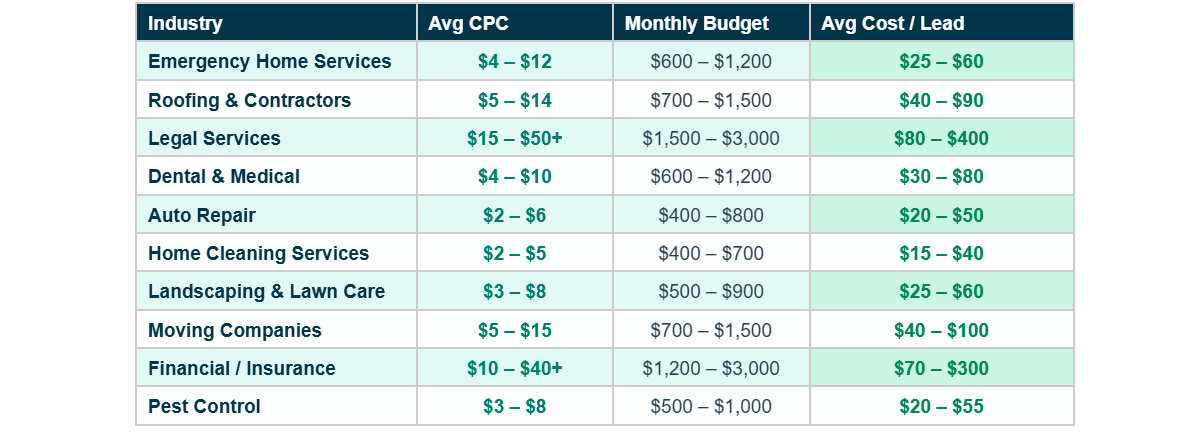
Important note: cost per click is not the same as cost per lead. Your cost per lead depends on how many clicks convert into actual phone calls or form submissions — which is driven by your landing page quality, your offer, and how tightly your ad matches the search intent.
A common mistake is comparing CPCs across industries without accounting for customer value. A legal firm paying $40/click might generate a client worth $5,000 — making $40 look cheap. A cleaning company paying $3/click on a $150 job needs a very high conversion rate to be profitable. Always think in terms of cost per lead and cost per acquired customer, not cost per click.
Most business owners approach Google Ads budgeting from the wrong direction. They look at how much they can afford to spend and then ask what results that will get them.
The smarter approach is to start from the outcome you need and reverse-engineer the budget that makes it possible. Here's the framework:
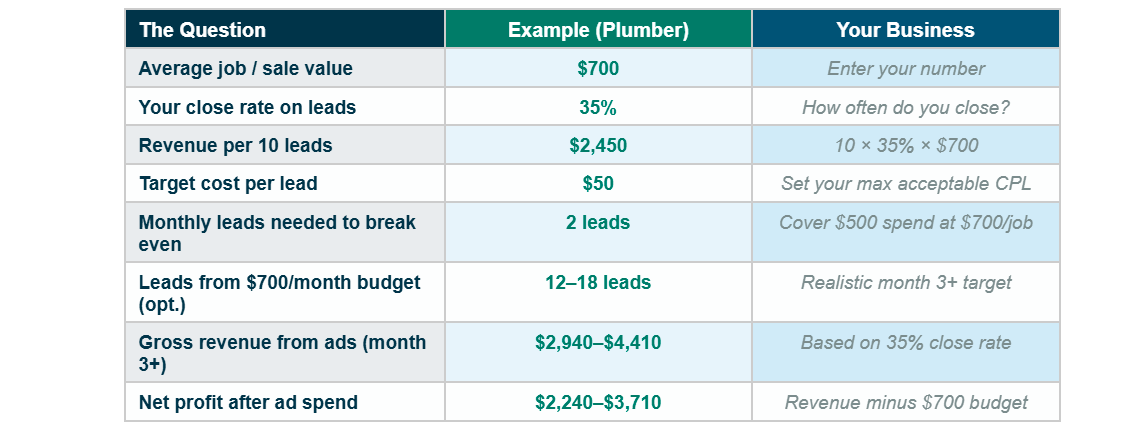
This plumber only needs to close 1 job to cover a $500 monthly ad spend. Everything above that is profit. This is how profitable Google Ads campaigns are evaluated — not by cost in isolation, but by return on that cost.
Calculate your Maximum Acceptable Cost Per Lead (MACPL): take your average job value, multiply by your close rate, and that's the revenue per lead. Your MACPL should be no more than 15–20% of that number to maintain a healthy margin. For a plumber with a $700 average job and 35% close rate: revenue per lead = $245. MACPL = $245 × 15% = ~$37. Any campaign generating leads below $37 is profitable. This single number tells you exactly what budget makes sense.
Here's what three different monthly budgets realistically deliver for a local service business in a mid-size US market — not best-case projections, but conservative estimates from optimized campaigns in month three or later:
Best for: very small service area, low-competition local market, testing the concept
What you get:
8–20 clicks/day at lower CPCs. Tight keyword list, 1 campaign, 1–2 ad groups. Limited data for optimization but enough to prove concept. Best for solo operators or businesses with very small service areas.
Realistic result (optimized campaign, month 3+):
4–10 leads/month. 1–4 jobs closed. Covers ad spend with a positive return if average job value is above $250.
Best for: most small local service businesses — the sweet spot for real results
What you get:
20–60 clicks/day. Multiple ad groups across different service types. Enough volume for meaningful optimization. Full conversion tracking insights. Algorithm has sufficient data to start Target CPA bidding by month 3.
Realistic result (optimized campaign, month 3+):
12–30 leads/month. 4–12 jobs closed. Strong positive ROI for most service businesses. This is where Google Ads becomes a reliable, predictable lead channel.
Best for: competitive markets, multiple service areas, aggressive growth targets
What you get:
60–150+ clicks/day. Full keyword coverage across all services and locations. Separate campaigns by service type. Google Local Service Ads running alongside Search. A/B testing ad copy and landing pages continuously.
Realistic result (optimized campaign, month 3+):
30–80+ leads/month. 10–30+ jobs closed. Dominant market position in most mid-size US cities. At this level, Google Ads becomes your primary growth driver.
The most expensive thing you can do with Google Ads is underspend. A $200/month budget might get you 40–60 clicks. That's not enough data to optimize, not enough volume to judge performance, and not enough leads to build any pattern. You'll conclude 'Google Ads doesn't work' when the real problem was simply that the budget was too small to give the platform a fair chance.
Your Google Ads budget has two components — and most business owners only plan for one of them.
This is the direct cost: every click on your ad charges against your daily budget. This is the number most business owners focus on. But it's only half the equation.
Google Ads is not a set-it-and-forget-it platform. Proper management requires weekly keyword review, bid adjustments, ad copy testing, landing page optimization, and conversion tracking monitoring. Someone has to do this work — either you (costing your time) or a professional (costing a management fee).
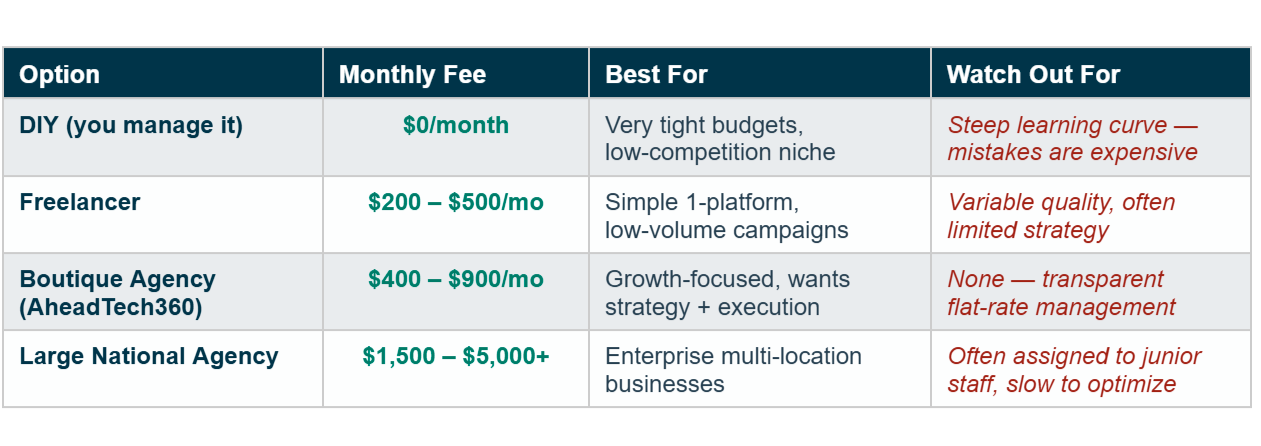
A realistic total monthly investment for a small business getting serious about Google Ads: $600–$1,000 in ad spend + $400–$700 in management = $1,000–$1,700/month total. At that level, a well-run campaign for a local service business should generate a clear, measurable positive return within 90 days.
At AheadTech360, we charge a transparent flat management fee — no percentage of ad spend, no hidden charges. Our clients always know exactly what they're paying and exactly what's being done with their budget. Every month we deliver a plain-English report showing cost per lead, leads generated, and return on ad spend. If we're not delivering, you should know — and we tell you before you ask.
One of the best things about Google Ads is that it scales in proportion to results. Here's the approach that works:
Month 1–2 — Test at minimum viable budget. The goal is not profit yet — it's data. Learn which keywords, audiences, and ad creatives generate clicks and conversions.
Month 3–4 — Optimize aggressively. Cut keywords spending without converting. Double down on keywords generating leads below your target CPL. Switch to Target CPA bidding once you have 30+ tracked conversions.
Month 5–6 — Scale what's proven. Once your cost per lead is consistently profitable, increase budget by 20–30% increments. Scaling too fast resets the algorithm's learning — go steady.
Month 6+ — Expand and dominate. Add new service-specific campaigns. Expand to neighbouring zip codes. Add Google Local Service Ads alongside Search for double visibility. Consider retargeting via Google Display for visitors who didn't convert.
Never increase budget on a campaign that isn't profitable at a smaller spend. More money on a broken campaign just loses money faster. Fix the fundamentals — targeting, landing page, offer — then scale.
Google Ads pricing is not fixed — it's determined by your industry, your market, your Quality Score, and how well your campaign is managed. But the fundamentals are clear: most local service businesses need $500–$1,500/month in ad spend to generate meaningful results, and the total investment including management typically ranges from $1,000–$2,200/month.
The most important shift in thinking is this: Google Ads is not a cost — it's an investment with a measurable return. A plumber spending $700/month in ad spend and generating 15 leads at a 35% close rate isn't spending $700 — they're generating $3,675 in revenue from a $700 investment. That's a 5.25x return.
Don't ask 'how much does Google Ads cost?' Ask 'what does a lead cost in my market, and what is that lead worth to my business?' Answer that question and your budget decision makes itself.