We helped 75+ brands generate $1.56M+ in revenue. Average ROI: 240% in Year 1
Building a business website feels overwhelming the first time you try to figure it out. There are too many platforms, too many decisions, and too much conflicting advice — and the stakes feel high because your website is often the first thing a potential customer sees before deciding whether to call you or your competitor.
The good news: the process is actually straightforward when you break it down into the right sequence. The businesses that end up with a website that genuinely works — one that ranks on Google, builds trust with visitors, and converts them into customers — are not the ones that spent the most money. They're the ones that followed the right steps in the right order.
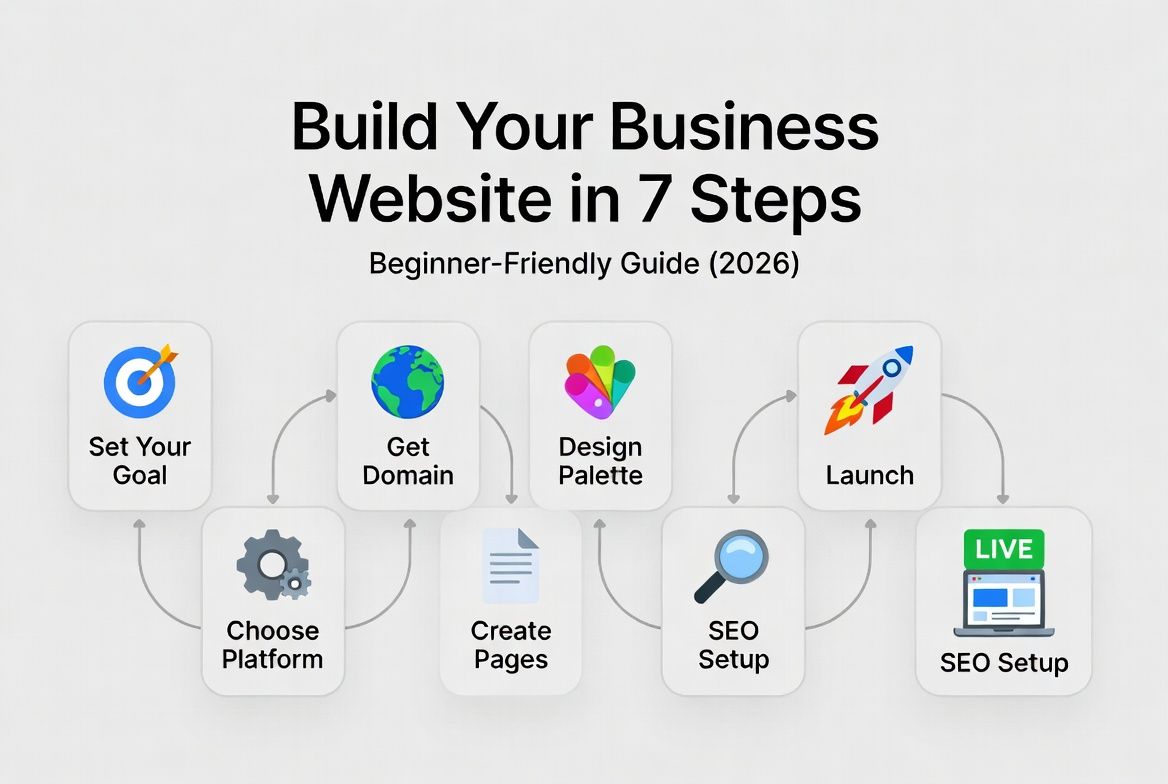
This guide walks you through all 7 steps to building a business website in 2026, with specific, actionable guidance at each stage — whether you're doing it yourself or working with a developer.
Every step in this guide reflects how AheadTech360 builds websites for small businesses — from the initial planning conversation to launch day and beyond.
Before You Start: The Question That Changes Everything
Before you choose a platform, buy a domain, or look at a single template — answer one question: what do you need your website to do for your business in the next 12 months?
Generate leads (phone calls, form submissions, booking requests) — Then your website needs strong service pages, a clear contact mechanism, local SEO optimization, and a fast mobile experience. Platform: WordPress.
Sell products online — Then your website needs product pages, shopping cart, payment processing, inventory tracking, and seamless checkout flow. Platform: Shopify or WordPress + WooCommerce.
Build credibility and authority — Then your website needs a professional design, clear social proof (testimonials, case studies, portfolio), and a blog for content marketing. Platform: WordPress.
Do all of the above — Then you need a properly scoped project with a developer who can build a site that handles multiple objectives without compromising any of them.
This answer determines your platform choice, your page structure, your content priorities, and your budget. Skip this step and you risk building a site that looks good but does the wrong job.
The single most common reason websites underperform is not technical — it's strategic. Business owners build a website focused on explaining their company ('About us,' 'Our team,' 'Our story') instead of focused on their customer's problem and how to solve it. Your homepage headline should speak directly to what your customer needs, not to what your business is. That shift alone — customer-first vs company-first — dramatically changes how a website converts.
Define Your Goals, Audience and Key Pages
Write down: what your business does, who your ideal customer is, what action you want website visitors to take, and which 5–7 pages you need at minimum. Don't skip this because it feels like admin — every technical decision downstream (platform, theme, structure) should serve these answers.
Minimum pages for most business websites:
Choose the Right Platform for Your Business Type
Platform choice determines your cost, capabilities, maintenance burden, and SEO ceiling for years. The shortcut: service businesses and content-heavy sites use WordPress. Product-based ecommerce uses Shopify. Custom functionality with unique business logic uses a full-stack build. See Blog 2 in this series for a complete side-by-side comparison.
Platform quick guide:
Register Your Domain and Set Up Hosting
Your domain name is your web address (yourbusiness.com). Choose something short, memorable, easy to spell, and ideally containing your business name or primary service. Register through Namecheap, Google Domains, or Cloudflare — not through your hosting provider (keeping them separate gives you more flexibility later).
Hosting selection by platform:
Design Your Website — Brand-First, Not Template-First
Most business owners choose a template first and try to fit their brand into it. The right approach is the reverse: define your brand colors, fonts, and visual style first — then find a template that can accommodate it, or build from scratch if budget allows.
Non-negotiable design principles for a business website:
Write Your Content — Customer-First, Not Company-First
Content is the most underestimated part of a website build. Most businesses spend 90% of their budget on design and 10% on writing — and wonder why their beautiful site doesn't convert. Your words do the selling. Your design just frames them.
What great business website content looks like:
Set Up SEO Before You Launch — Not After
SEO is not something you add to a website after it's built. The decisions made during build — URL structure, page titles, header hierarchy, image alt text, site speed, schema markup, internal linking — determine how well your site ranks from day one. Fixing these after launch costs 2–3x more time than doing them correctly upfront.
Pre-launch SEO checklist:
Launch, Test, and Set Up Your Post-Launch Monitoring
Launch day is not the finish line — it's the start of the compounding work that turns a website into a business asset. Before you go live, run through a complete pre-launch test. After launch, set up the monitoring that tells you whether your site is actually doing its job.
Pre-launch final checks:
Post-launch monitoring to set up:
Based on hundreds of business website builds, here are the pages that matter most — what each one must include, why it matters for SEO, and which are absolutely non-negotiable:
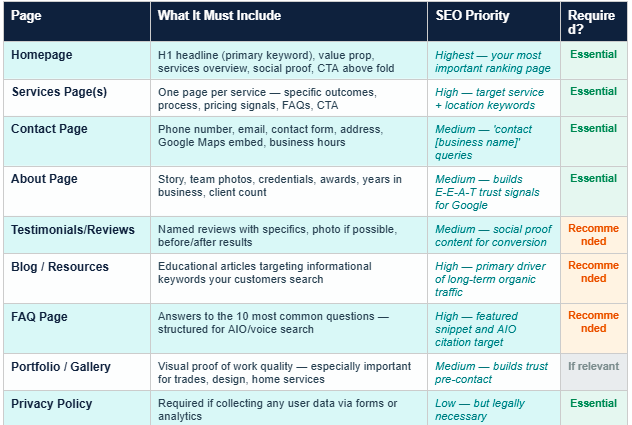
The most overlooked page on most small business websites is the FAQ page. It's one of the highest-impact pages you can add for both SEO and conversions — because it targets the exact question-format searches that Google's AI Overview and voice search pull from, and it eliminates the objections that stop potential customers from picking up the phone. Add an FAQ section to every service page and build a standalone FAQ page targeting your most searched questions.
There is no universally right answer — but there is a right answer for your specific situation. Here's an honest comparison to help you decide:
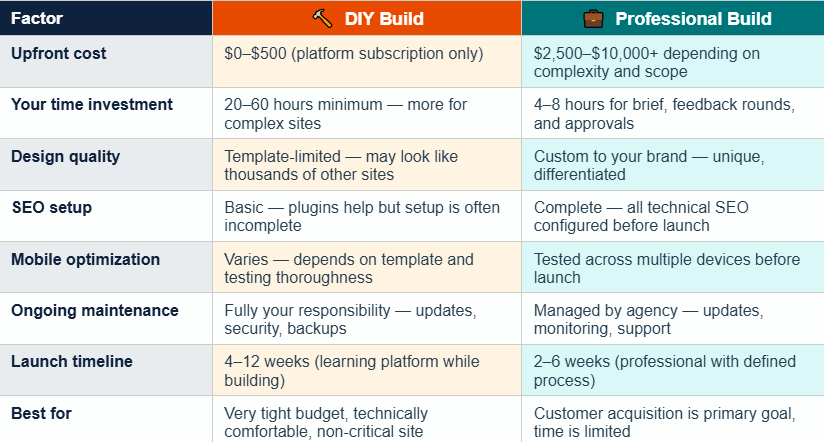
If your website's job is to generate customers — meaning it's a primary channel for new business — hire a professional. The difference in performance between a DIY template site and a properly built, SEO-optimized, conversion-focused site is significant, and the gap in new business generated typically pays for the professional build within 2–4 months. If your website is purely a credibility signal and you generate business primarily through referrals, DIY is a completely legitimate choice.
At AheadTech360, we see both paths regularly. The businesses that come to us after attempting DIY almost always say the same two things: 'I spent way more time on it than I expected' and 'I'm not happy with how it looks or how it performs.' The ones who built it with us from the start typically have a site generating leads within 60 days of launch — because the SEO foundation, the conversion optimization, and the content strategy are all in place before the first visitor arrives.
Building a business website in 2026 is not complicated — but it requires doing the right things in the right order. The businesses with websites that actually generate customers didn't get there by picking a template and filling it with generic company information. They got there by being clear on what the site needs to do, building it on the right platform, writing content that speaks to their customer's problem, setting up SEO before launch, and monitoring performance after.
The most expensive website is the one you build twice — once when you're trying to figure it out, and again when you realize the first one isn't working. Whether you build it yourself or work with a developer, following the seven steps in this guide puts you on the right path the first time.
Your website is not a digital business card. It's your best salesperson — the one that works 24 hours a day, answers every question a potential customer has, and closes appointments while you sleep. Build it like one.