We helped 75+ brands generate $1.56M+ in revenue. Average ROI: 240% in Year 1
You've decided to try Google Ads. You go to ads.google.com, create an account, and immediately see a screen full of options you've never heard of — campaign types, bidding strategies, match types, Quality Score, conversion actions, ad extensions.
Most business owners click through it as fast as possible, guess at the settings, and launch. Two weeks later, the budget is spent and the phone hasn't rung once.
The setup is where most Google Ads campaigns fail. Not the budget. Not the platform. The first 30 minutes of decisions that determine whether the next 90 days generate leads or just drain your bank account.
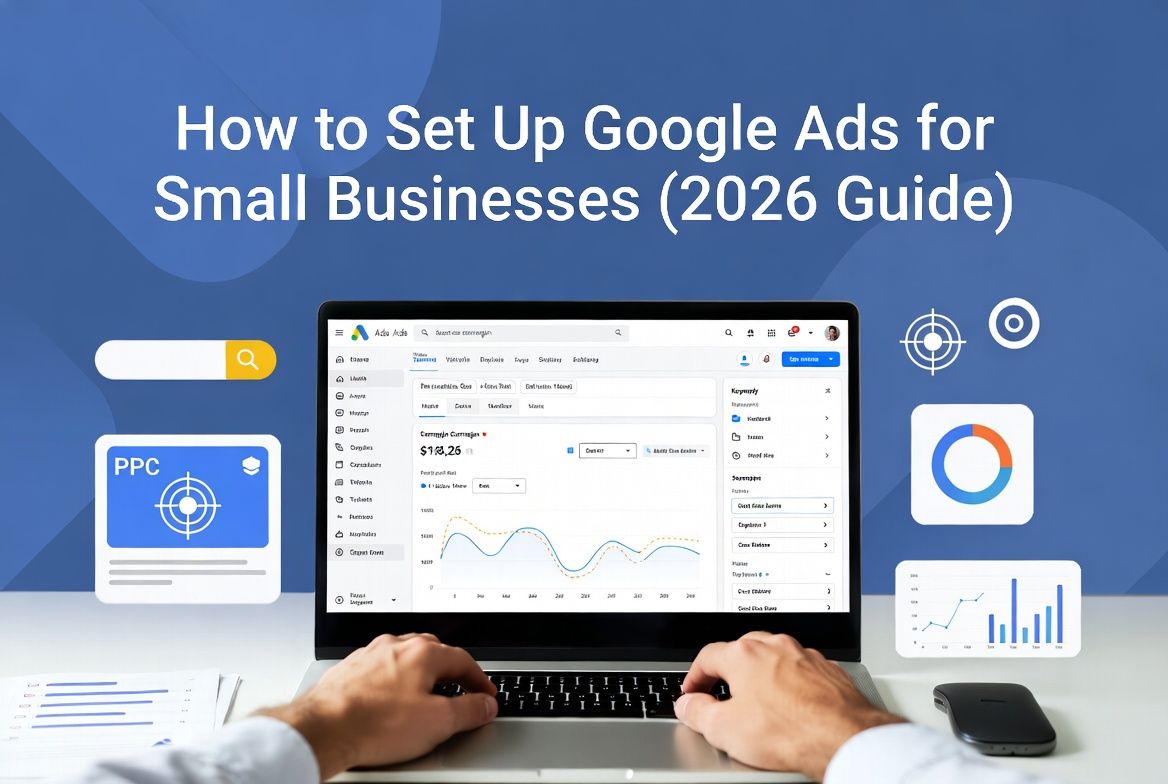
This guide walks you through every key decision — not just what button to click, but why each choice matters and what happens if you get it wrong. Follow these seven steps and you'll have a campaign built on a proper foundation from day one.
At AheadTech360, setup is the phase we spend the most time on — more than optimization, more than reporting. A campaign built on the right foundation consistently outperforms one that was rushed through setup, even with identical budgets. Getting this right from the start is worth the extra hour.
These three things must be clear before you create your first campaign. Skipping them is how people waste their first $500 in the first week.
What is your specific offer? — Not your general service. Your campaign-specific offer. 'We offer plumbing services' is not an offer. '$89 drain cleaning, same-day, licensed plumber in Austin' is an offer. Your offer determines your keywords, your ad copy, and your landing page. Without a clear offer, everything else falls apart.
What is one new customer worth to you? — If your average job is $400 and you close 1 in 3 leads, you can spend up to $133 per lead and break even. Knowing this number tells you what budget makes sense and how to evaluate whether your campaign is profitable.
Where will you send the traffic? — This cannot be your homepage. You need a dedicated landing page for this specific offer — one headline, one phone number, one form. If you don't have this yet, build it before you launch. Sending paid traffic to a generic homepage is the single most common waste of Google Ads budget we see.
🚩 If you cannot answer all three of those questions with specific numbers and a specific page URL, stop. Build those foundations first. Launching without them is guaranteed to waste your budget.
Choose the Right Campaign Type
Google offers several campaign types. For most small businesses, the choice is straightforward — but Google will try to steer you toward options that benefit Google, not necessarily you.
Search Campaign (Recommended for most small businesses)
Your ads appear as text in Google search results when someone types your target keywords. This is the highest-intent ad type — you're reaching people who are actively searching for what you offer right now. For local service businesses, this is almost always where to start.
Performance Max (Avoid at First)
Google pushes this heavily as an 'automated' option that runs across Search, YouTube, Gmail, and Display simultaneously. The problem for small businesses: you have almost no control over where your ads appear, and the algorithm needs significant conversion data to work well. Avoid until you have 3+ months of Search campaign data.
Important — Disable 'Smart Campaign' if prompted:
When you first open Google Ads, it will try to guide you through a 'Smart Campaign' setup designed for people who want zero control. Smart Campaigns give Google complete control over targeting, keywords, and bidding. Almost universally delivers poor results for small businesses. When asked, choose 'Switch to Expert Mode' instead.
Keyword Research — Keep It Tight and Specific
Your keywords determine who sees your ads. Too broad and you waste money on people who will never buy. Too narrow and nobody sees your ads. For small businesses, the winning strategy is a small list of highly specific, high-intent keywords.
Start with 10–15 keywords, not 100.
For a plumber in Dallas, that list might be: 'plumber Dallas,' 'emergency plumber Dallas,' 'drain cleaning Dallas,' 'water heater repair Dallas,' and 'leak repair Dallas.' That's 5 tightly targeted keywords that are all highly likely to convert. That beats 100 broad keywords every time.
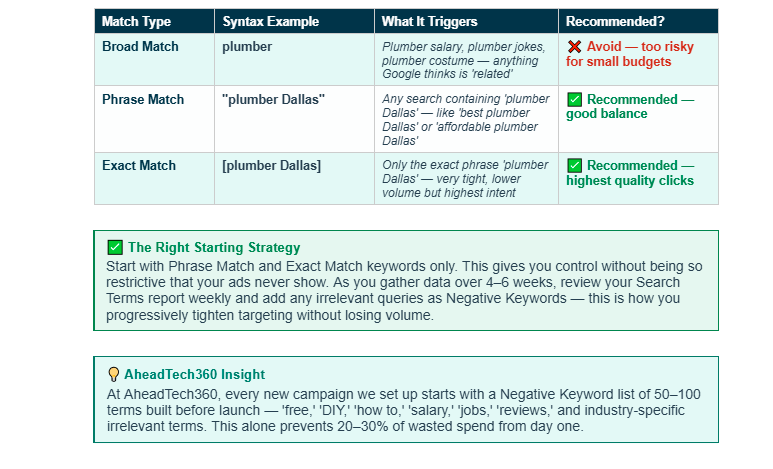
Match types control how closely someone's search query must match your keyword before your ad shows. This single setting determines whether you attract the right people or waste budget on irrelevant clicks.
Set Your Budget and Bidding Strategy
The budget is how much you're willing to spend per day. Bidding strategy is how Google decides when to show your ad and how much to pay per click.
Daily Budget:
Divide your monthly ad budget by 30 to get your daily budget. A $600/month budget = $20/day. Google may spend up to 2x your daily budget on high-traffic days but will not exceed your monthly total. Start with the minimum that gives you 3–5 clicks per day — enough to gather data without burning through the budget too fast.
Bidding Strategy — What to Choose:
Maximize Clicks (Months 1–2): Tells Google to get you as many clicks as possible within your budget. Best choice when you have no conversion data yet — lets the algorithm learn without restricting bids artificially.
Target CPA — Cost Per Acquisition (Month 3+): Once you have 30+ tracked conversions, switch to Target CPA and tell Google your target cost per lead. Google's algorithm will optimize bids to hit that target. This is where campaigns become truly efficient.
Avoid 'Target Impression Share' and 'Enhanced CPC' when starting out — both require more data than a new campaign has.
Write Ad Copy That Gets Clicks
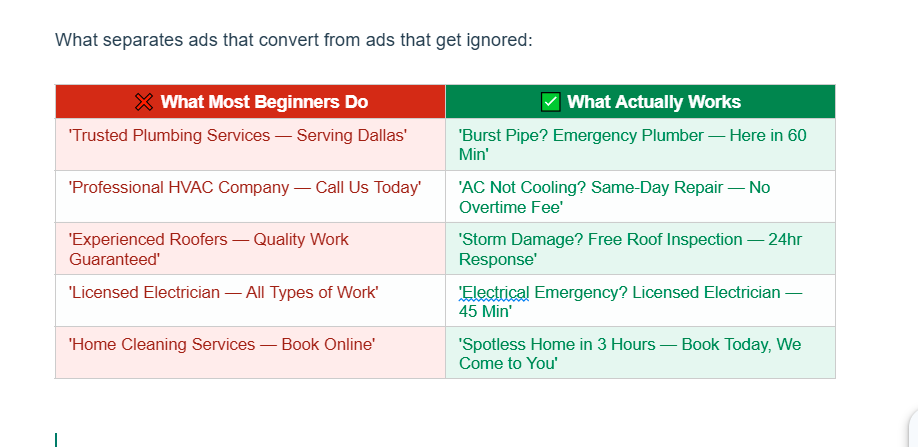
A Google Search ad has three headlines (up to 30 characters each) and two descriptions (up to 90 characters each). Every character counts. Your ad competes against 3–4 others on the same page, and you have about 1.5 seconds to earn the click.
The formula that works:
Description: Expand the offer and give a clear call to action — 'Serving Dallas since 2008. Fast response, upfront pricing, no surprises. Call now for same-day service — free estimate included.'
Write at least 3 different headline combinations and let Google's Responsive Search Ads test which combination performs best automatically.
Set Up Conversion Tracking — The Non-Optional Step
This is the step most beginners skip. It is also the most expensive mistake you can make. Without conversion tracking, you have no idea which keywords are generating leads and which are wasting money. You're spending blind.
Set up these conversion actions before you launch:
Use Google Tag Manager to install conversion tracking — it requires pasting one code snippet into your website and setting up triggers for each action. Google has a free step-by-step guide. If this is too technical, have your web developer handle it or ask your agency — but do not launch without it.
After setup: use Google Tag Assistant (free Chrome extension) to verify every conversion action is firing correctly on the right pages before you spend a dollar.
🚩 We have audited Google Ads accounts where businesses spent $3,000–$5,000 with zero tracked conversions — not because the ads weren't generating leads, but because tracking was never set up. They had no idea which campaigns were working and which weren't. Every dollar after the first week was wasted optimization spend.
Build or Optimize Your Landing Page
Your ad gets people to click. Your landing page gets them to call or fill out the form. A weak landing page will kill even the best-performing ad campaign. These are the non-negotiable elements:
One page, one offer, one call to action. No navigation menu leading visitors away. No links to blog posts or social media. One decision: call or fill the form.
At AheadTech360, we review every client's landing page before launching a campaign — and in most cases we recommend changes before the first dollar is spent. A landing page with a 3% conversion rate vs a 7% conversion rate on the same traffic doubles your leads without increasing budget. The landing page is where the money is.
Launch, Then Optimize Every Week
Setup is done. Campaign is live. Now the real work begins — and it's not optional. Google Ads is not a set-it-and-forget-it channel. A campaign that isn't actively optimized every week will drift toward wasted spend.
Your weekly optimization checklist:
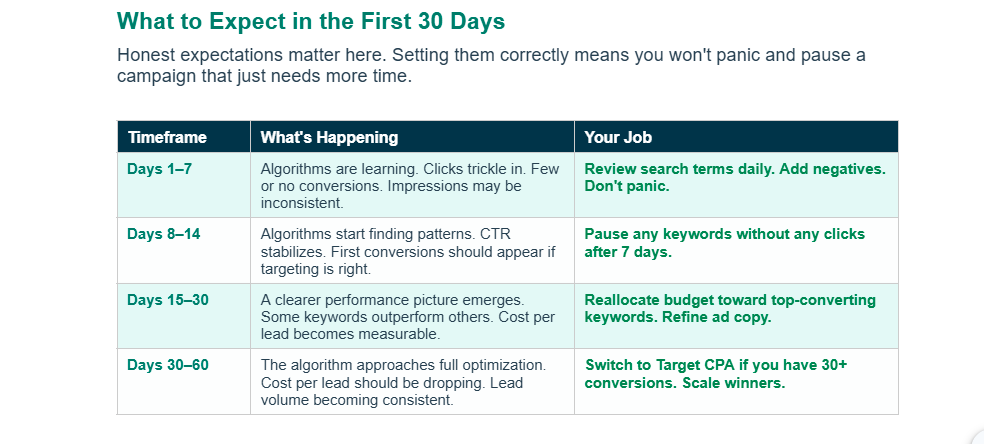
Commit to 60 days minimum before judging campaign performance. Month one is data collection. Month two is optimization. Month three is when most properly managed campaigns reach profitable, consistent performance.
Setting up Google Ads correctly is not complicated — but it does require making the right decisions at each of these seven steps. The businesses that waste their first $500 almost always made the same three mistakes: they chose the wrong campaign type (Smart Campaign or Performance Max), they sent traffic to their homepage instead of a dedicated landing page, and they launched without conversion tracking.
Follow the seven steps in this guide — choose Search campaigns, use Phrase and Exact match keywords, build a proper negative keyword list, write offer-led ad copy, set up conversion tracking before launch, send traffic to a dedicated landing page, and optimize every week — and you'll have a campaign built on a foundation that can generate real, measurable leads.
The setup takes a few hours. The returns from doing it right can last for years.