We helped 75+ brands generate $1.56M+ in revenue. Average ROI: 240% in Year 1
If your Facebook Ads are generating clicks but not customers — or worse, barely generating any clicks at all — targeting is almost certainly the problem.
Facebook's advertising platform has the most sophisticated audience targeting system available to small businesses. You can reach people by age, location, income level, homeownership status, recent life events, purchase behaviour, and dozens of other signals. You can even upload your customer list and find thousands of new people who look exactly like your best existing customers.
But that power cuts both ways. Done wrong, Facebook targeting means showing your ad to millions of people who will never buy from you — burning through your budget with nothing to show for it. Done right, it means your $500/month ad spend reaches the 40,000 people in your city most likely to become your next customer.
This guide covers all five Facebook audience types, how to layer them for maximum precision, the targeting mistakes that waste the most money, and the exact setup that works for most local small businesses.
At AheadTech360, targeting setup is where we spend the most time when launching a new Meta Ads campaign. It is also the area where we find the most problems when auditing existing campaigns. The most common issue is not that clients are targeting the wrong people — it's that they're targeting too many people with no layering, or too few people with too many restrictions. Both extremes inflate cost per lead significantly.
Most small business owners assume that spending more money is the solution when Facebook Ads underperform. In most cases, it isn't. A $2,000/month campaign with poor targeting will consistently lose to a $500/month campaign with precise targeting — because Facebook's algorithm optimizes based on the audience you define, not the budget you set.
Here is what happens when targeting is wrong: Facebook shows your ad to a broad, generic pool of people. Most of them have no interest in your service. They scroll past without clicking. Your click-through rate drops. Facebook's algorithm interprets a low CTR as a signal that your ad is irrelevant to this audience. It raises your CPM as a penalty for low engagement. Your cost per click and cost per lead both increase. You spend more to reach fewer of the right people.
And here is what happens when targeting is right: your ad reaches a smaller but highly relevant audience. CTR is higher. The algorithm interprets this as a positive relevance signal. CPM stays low or decreases. You reach more of the right people for the same spend — and your cost per lead drops significantly.
Just like Google's Quality Score rewards ad relevance with lower CPCs, Meta's algorithm rewards audience relevance with lower CPMs. A tightly targeted campaign with a 2.5% CTR will pay significantly less per impression than a broadly targeted campaign with a 0.7% CTR — even if the bids are identical. Relevance to the audience is not just a targeting goal — it's a cost reduction strategy.
Meta Ads Manager gives you five distinct ways to define who sees your ads. Each one serves a different purpose at a different stage of your campaign. Understanding all five — and knowing which to use when — is what separates professional campaigns from amateur ones.
Core Audience (Interest & Demographic Targeting)
When to use it:
Use Core Audience when you are starting a new campaign with no existing customer data — no pixel history, no customer list. It's also the right choice for reaching entirely new audiences beyond your existing customer base.
Core Audience lets you target by location (city, zip code, radius), age, gender, language, interests, and behaviours. You build your audience by selecting combinations of these signals in Meta Ads Manager.
What you can target:
💡 Pro Tip: Keep Core Audiences between 200K–2M people for local businesses. Larger than 2M loses precision; smaller than 100K inflates CPM. Start broad and let Meta's algorithm narrow delivery based on performance data.
Custom Audience (Your Existing Data)
When to use it:
Use Custom Audience when you have existing data to work with — a customer list, website visitors tracked by the Meta Pixel, video viewers, Instagram followers, or people who previously engaged with your ads. This is your warmest, highest-converting audience type.
Custom Audiences let you reach people who already know your business. Because these people have already had some exposure to your brand — whether by visiting your website, watching your video, or being an existing customer — they convert at dramatically higher rates than cold audiences and at a much lower cost per lead.
Sources you can use:
💡 Pro Tip: The Meta Pixel takes time to accumulate data — install it on your website immediately, even before you run your first ad. Every website visitor tracked now becomes a retargeting asset for future campaigns.
Lookalike Audience (Find More of Your Best Customers)
When to use it:
Use Lookalike Audience when your Custom Audience source has at least 500 people and you want to reach entirely new potential customers who share characteristics with your existing ones. This is the most powerful cold audience type available on Meta.
Lookalike Audiences use Meta's machine learning to analyze the characteristics of your Custom Audience source — demographics, interests, online behaviour — and find millions of other Facebook users who share those same patterns. You tell Meta 'find me more people like my best customers' and Meta does the rest.
A 1% Lookalike built from your customer list or website purchasers is consistently one of the highest-performing cold audience types across most industries. It combines the precision of Custom Audience data with the scale needed to generate meaningful lead volume.
💡 Pro Tip: A 1% Lookalike (the most similar) is always the best starting point. Once 1% is performing profitably, test 2–3% for more reach at slightly lower precision. Never start with a 5–10% Lookalike — the similarity to your source audience becomes too diluted.
Retargeting Audience (Re-Engage Warm Prospects)
When to use it:
Use Retargeting when someone has visited your website, watched your video, or engaged with your content but has not yet converted. These are high-intent prospects who already know you exist — they just haven't pulled the trigger yet.
Retargeting is consistently the lowest cost-per-lead targeting type in any Meta campaign. Someone who visited your pricing page, watched 75% of your video ad, or clicked your ad but didn't fill out the form is telling you something: they're interested, but they need another nudge. Retargeting gives them that nudge at exactly the right moment.
AheadTech360 clients who add a retargeting campaign to their existing cold-audience campaigns see an average 35–55% reduction in blended cost per lead — because the retargeting audience converts at 3–5x the rate of cold audiences at a fraction of the CPM.
💡 Pro Tip: Keep retargeting audiences fresh — 30-day website visitor audiences outperform 90-day audiences in most industries because the prospect's intent is more recent. Use a different ad creative for retargeting than for cold audiences — these people have already seen your brand, so generic awareness ads feel repetitive.
Local & Radius Targeting (For Service Area Businesses)
When to use it:
Use Local Targeting as the foundation of every campaign if you run a location-based business. Setting the right service area is the single most important targeting decision for plumbers, cleaners, dentists, restaurants, and any business that serves customers in a defined geographic area.
Meta Ads allows you to target by specific cities, zip codes, a radius around an address, or a combination. For most local service businesses, a 10–25 mile radius around your primary location is the right starting point — close enough to be realistic, wide enough to generate meaningful audience size.
For businesses serving multiple locations — e.g., a cleaning company covering 3 zip codes — create separate ad sets for each service area rather than one broad radius. This lets you customize ad copy (mentioning the specific neighbourhood or city) and track which locations generate the best CPL.
💡 Pro Tip: For service area businesses, use the 'People who live in this location' option — not 'People who were recently in this location' or 'People traveling in this location.' You want residents, not tourists. Set your radius based on your realistic service area — not your wishful service area.
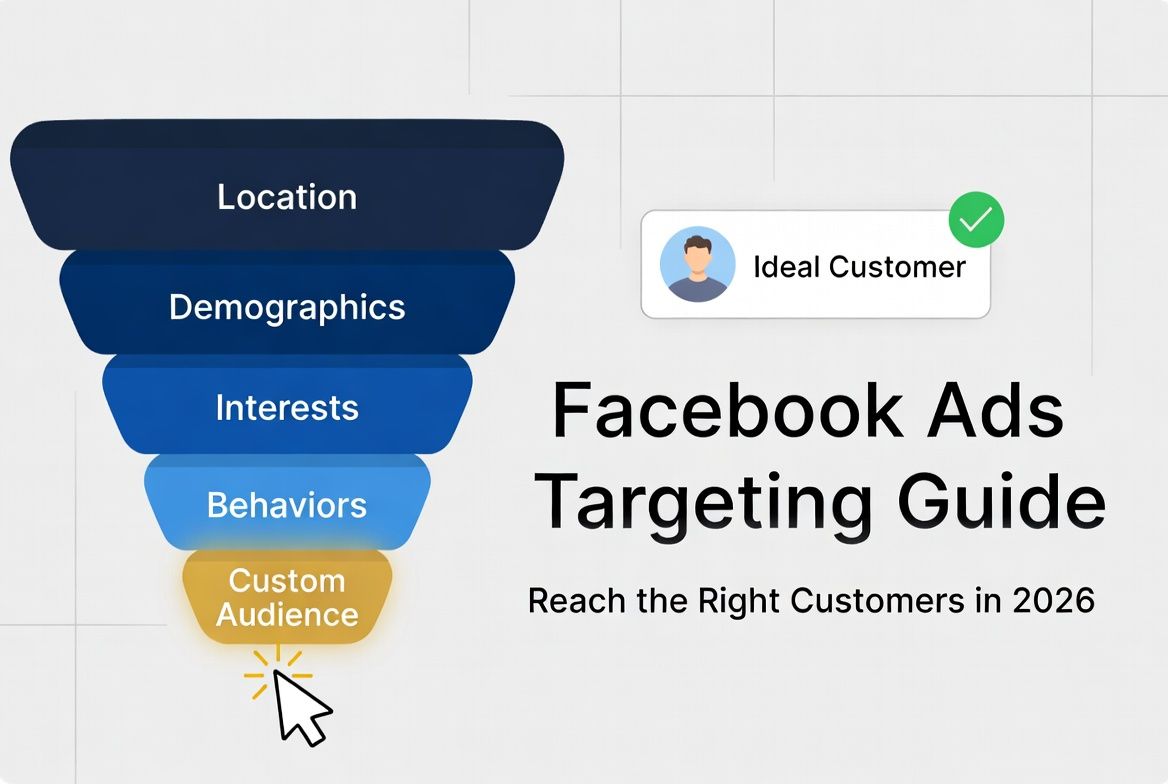
The real power of Meta's targeting system is not any single audience type — it's the ability to layer them together. Layering means stacking multiple targeting signals so your ad reaches only people who match all of your criteria simultaneously.
Here's a real-world example: a residential cleaning company targeting homeowners in Phoenix, AZ. Instead of targeting everyone in Phoenix aged 25–65 (which could be 2 million people), they layer their targeting to reach only the most relevant slice of that population:
Location → City / zip code / radius — 15 miles around Phoenix, AZ
Age → 35–60 years old — primary homeowner age range
Interest → Home improvement · Homeownership · DIY projects · HGTV
Behavior → Homeowners (FB category) · Recent mover · High household income
Estimated audience: 45,000–90,000 people → Relevant, sizeable, competitive CPM
The result is an audience that is large enough to generate meaningful ad delivery and data — but precise enough that the vast majority of people who see the ad are plausible customers. This is the sweet spot that drives down CPM and drives up conversion rate simultaneously
One of the most powerful layering combinations we use at AheadTech360 for home service businesses: Core Audience (homeowners, 35–60, 15-mile radius) as the cold campaign, retargeting website visitors from the past 30 days as the warm campaign, and a 1% Lookalike built from the client's past customer list as the scale campaign. All three run simultaneously with different budgets and different creative. This three-layer structure consistently delivers the lowest blended cost per lead of any single-audience approach.
These are the targeting errors that cost small businesses the most money — and the fixes that resolve them immediately:
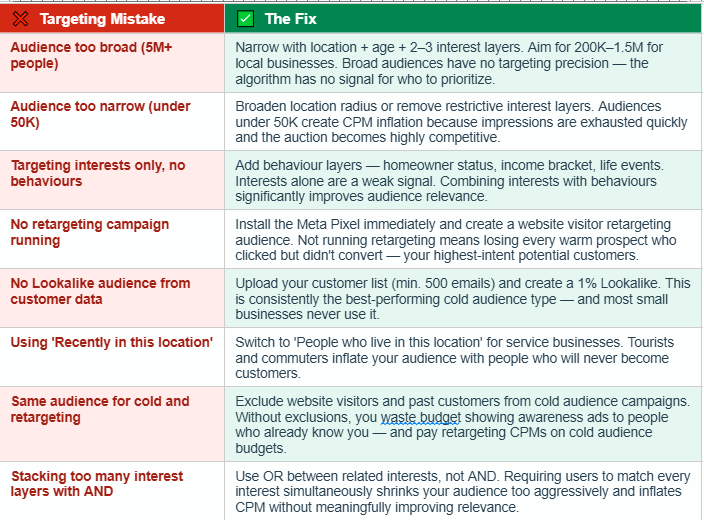
The Meta Pixel is the foundation of your most valuable audiences — Custom Audiences, Retargeting, and Lookalikes all depend on it. If you don't have the Pixel installed on every page of your website right now, you are actively losing the ability to build these audiences every single day. Install it today — even if you're not running ads yet. Every visitor tracked now is a potential retargeting audience member tomorrow.
If you're starting from scratch or rebuilding a campaign that isn't working, here is the exact targeting structure we recommend for most local service businesses with a $500–$1,000/month budget:
Campaign 1 — Cold Audience (60–70% of budget): Core Audience targeting. Location radius 10–20 miles. Age range matched to your customer profile. 2–3 interest layers + 1–2 behaviour layers. Audience size: 150K–800K. Objective: Lead Generation using Facebook native forms.
Campaign 2 — Retargeting (20–25% of budget): Website visitors (last 30 days) + video viewers (75%+ watched) + ad engagers (last 60 days). Exclude current customers. Different creative than cold campaign — specific offer or testimonial. Objective: Lead Generation or Messages.
Campaign 3 — Lookalike (10–15% of budget, add after month 1): 1% Lookalike built from your customer list or website purchasers. Exclude existing Custom Audiences to avoid overlap. Use once cold audience is generating leads consistently and you have 500+ people in source audience.
Your audience should be large enough for the algorithm to find patterns and optimize delivery, but small enough that most people who see your ad are plausible customers. For most local service businesses, this means a total active audience of 150K–1.5M people across all campaigns. Below 50K and your CPMs spike. Above 2M and your relevance drops. Stay in the sweet spot and let Meta's machine learning do the rest.
The Bottom Line
Facebook targeting is not about finding the most people — it's about finding the right people. The businesses spending $500/month and generating 30 quality leads are not doing it with a bigger budget than their competitors. They're doing it with better targeting, smarter layering, and a campaign structure that serves the right ad to the right audience at the right stage of the buyer journey.
Start with a solid Core Audience for cold traffic. Install the Meta Pixel immediately to build retargeting and Lookalike capabilities. Exclude past customers and current website visitors from cold campaigns to avoid wasted impressions. And check your audience size before every campaign launch — too broad and you lose precision, too narrow and you lose efficiency.
Targeting is the foundation everything else is built on. Get it right and your budget works harder. Get it wrong and no amount of spending will save your campaign.