We helped 75+ brands generate $1.56M+ in revenue. Average ROI: 240% in Year 1
You set up your Facebook Ads. You wrote what felt like a reasonable headline. You picked an audience. You hit publish. And then... nothing. A few clicks, maybe. A handful of impressions. Zero leads.
You wait a week. Still nothing meaningful. You wonder if you wasted your money. You start thinking 'Facebook Ads just doesn't work for my type of business.'
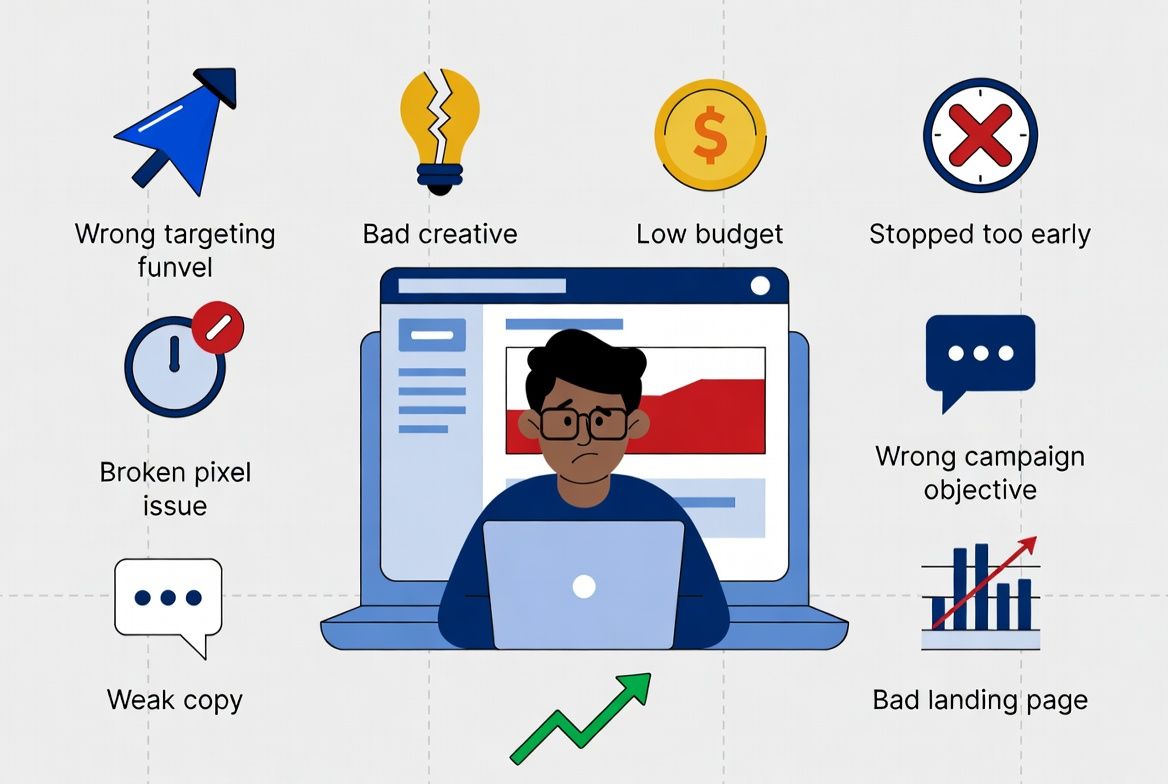
Here's the honest truth: Facebook Ads almost certainly can work for your business. But the platform is unforgiving of setup mistakes — and most small businesses running their own ads are making at least two or three of the problems on this list simultaneously.
The good news: every single problem in this guide is fixable. Most of them can be resolved within a single day of work. But you need to know which problem you're dealing with before you can fix it — and that's what this guide is for.
At AheadTech360, the most common thing we hear from new clients is some version of 'we tried Facebook Ads and it didn't work.' When we audit their accounts, we almost never find a situation where the platform genuinely can't work for that business. What we find instead are compounding setup mistakes — wrong objective, broad targeting, weak creative, and no retargeting — all running simultaneously on an underfunded campaign. Fixing these issues in the right order is what turns a failing campaign into a profitable one.
Before blaming your campaign for not working, you need to rule out the most common non-problem: your campaign is still in Meta's Learning Phase and hasn't had enough time or budget to stabilize. This is not a failure — it's a mandatory period every new campaign goes through.
Why your campaign looks broken in week 1 — and what to do about it
What is it? When you launch a new campaign or make significant changes to an existing one, Meta enters a Learning Phase. During this period, the algorithm is testing different audience segments, placements, and delivery times to find the optimal combination for your objective. Results are inconsistent, costs are inflated, and performance does not reflect what your campaign will deliver long-term.
How to exit it: Meta requires 50 optimization events (leads, purchases, or clicks — depending on your objective) per ad set within a 7-day period to exit learning phase. If your budget is too low to generate 50 events per week, your campaign stays in learning phase indefinitely. Minimum daily budget per ad set: $15–$20 for lead generation campaigns.
What resets it: Changing your bid strategy, significantly adjusting your budget (more than 20% increase or decrease), editing your audience targeting, swapping out your ad creative, or adding/removing ads within an ad set all reset the learning phase. Constant editing is one of the primary reasons campaigns never stabilize. Resist the urge to change things daily — give campaigns at least 7 days before making any adjustments.
How long does it take: Typically 7–14 days for campaigns with adequate budget and a high-converting offer. Up to 30 days for lower-budget campaigns or less frequent conversion actions. Once exited, CPL typically drops 20–35% and delivery stabilizes significantly.
If your campaign has been live for less than 14 days and hasn't generated 50 optimization events, the inconsistent results you're seeing are normal. Give it time and adequate budget before making changes. The problems below apply to campaigns that have exited the learning phase and are still underperforming.
❌ Your Audience Is Too Broad
🔍 Symptoms: High impressions, very low CTR (under 0.5%), high CPM, leads barely trickling in despite decent budget.
⚠️ Root Cause: When your audience is 3–10 million people with no layered targeting, Facebook has no meaningful signal for who to prioritize. It shows your ad to everyone — most of whom have zero interest in your service. Low engagement signals to the algorithm that your ad is irrelevant, which raises CPM and lowers delivery quality.
✅ The Fix: Narrow your audience with location + age + 2–3 relevant interest and behaviour layers. For local service businesses, target 150K–800K people maximum. Add homeowner status, income range, and life event targeting if available for your category. See Blog 4 in this series for a complete targeting setup guide.
❌ Your Creative Isn't Stopping the Scroll
🔍 Symptoms: Very low CTR (under 0.7%) despite reasonable audience size. High cost per click. Ad has been running 2+ weeks with no improvement in engagement.
⚠️ Root Cause: In a Facebook or Instagram feed, your ad competes with posts from friends, family, and other advertisers for attention. If the first frame of your video or the visual of your image doesn't immediately communicate value or create curiosity within 1–2 seconds, users scroll past without registering what you're offering. Generic stock photos, text-heavy images, and corporate-style creative consistently underperform against authentic, specific, visually compelling ads.
✅ The Fix: Test 3–4 different creative variations simultaneously. Try: a before/after image specific to your service, a short video (15–30 seconds) showing the actual work you do, a customer testimonial in their own words, or a direct offer visual with a specific dollar amount or discount. Authentic smartphone-shot content often outperforms polished studio production on Facebook because it blends naturally into the organic feed.
❌ Your Offer Is Too Weak
🔍 Symptoms: Decent CTR (people are clicking) but very low conversion rate on the landing page or lead form. Cost per lead is extremely high despite reasonable cost per click.
⚠️ Root Cause: Clicks are not conversions. If your ad creative is compelling enough to generate clicks but your offer doesn't give people a specific, concrete reason to fill out a form or book a call right now, they click, look around, and leave. 'Professional cleaning services — contact us' is not an offer. It's a generic statement. Facebook users are not in buying mode the way Google searchers are — they need a reason to stop scrolling and take action immediately.
✅ The Fix: Create a time-bounded, specific offer: '$89 first clean for new customers this month,' 'Free 30-minute consultation — 10 spots available this week,' or 'Book before Friday and get 20% off your first service.' The more specific and urgent the offer, the higher the conversion rate. Test at least 2–3 different offers in your first 60 days to identify which one resonates most with your audience.
❌ Wrong Campaign Objective
🔍 Symptoms: Lots of reach and impressions but very few leads or sales. You may be getting website visits but almost no one is converting. Budget is spending but producing the wrong outcomes.
⚠️ Root Cause: Facebook optimizes your campaign for whatever objective you select. If you choose 'Traffic' as your objective, Meta will find people most likely to click — not people most likely to fill out a form or make a purchase. If you choose 'Reach,' it will maximize impressions with no regard for conversion intent. Most small businesses running lead generation campaigns should be using the 'Leads' objective with Facebook native lead forms, not Traffic or Awareness objectives.
✅ The Fix: Switch to the 'Leads' objective and use Facebook's native Lead Generation forms instead of sending traffic to your website. Lead forms let users submit their contact details without leaving Facebook — which reduces friction significantly and typically generates a 35–55% lower cost per lead than website traffic campaigns for local service businesses.
❌ Budget Too Low to Exit Learning Phase
🔍 Symptoms: Campaign shows 'Learning' status in Ads Manager for more than 2 weeks. Results are inconsistent — some days zero leads, other days two or three. No stable pattern.
⚠️ Root Cause: Meta requires 50 optimization events per ad set within 7 days to exit the learning phase. If your daily budget is $8–$10 per ad set and your cost per lead is $40, you're generating 1–2 leads every 4–5 days per ad set — nowhere near the 50/week needed. The campaign never learns, never stabilizes, and never reaches its potential performance.
✅ The Fix: Consolidate ad sets to concentrate budget. Instead of running 4 ad sets at $8/day each ($32/day total), run 1–2 ad sets at $16–$20/day. More budget per ad set means faster learning phase exit, lower CPL after stabilization, and more reliable delivery. Minimum recommended spend per ad set per day: $15–$20 for lead generation campaigns.
❌ No Retargeting Campaign Running
🔍 Symptoms: Your cold audience campaign is generating clicks and some leads, but your overall cost per lead feels higher than it should be. You have no idea how many people clicked but didn't convert.
⚠️ Root Cause: Without retargeting, every prospect who clicks your ad but doesn't immediately convert — typically 85–95% of clickers — is gone forever. You paid for that click, built some brand awareness, and then let them walk away without a second chance to convert. For businesses where customers take 2–5 touchpoints before making a decision, running only a cold audience campaign wastes the majority of the value generated by your ad spend.
✅ The Fix: Install the Meta Pixel on your website immediately if you haven't already. Create a retargeting ad set targeting website visitors from the last 30 days with different creative — a testimonial, a specific offer, or a direct 'still thinking about it?' message. Retargeting audiences convert at 3–5x the rate of cold audiences at a significantly lower CPM. It's the highest-ROI addition you can make to any existing campaign.
❌ Landing Page Doesn't Match the Ad Promise
🔍 Symptoms: Good CTR on the ad — people are clicking. But conversion rate on the landing page is very low (under 5%). Cost per lead is high despite reasonable cost per click. People are arriving at your site and leaving immediately.
⚠️ Root Cause: When someone clicks your ad expecting a specific offer — '$89 first cleaning' — and arrives at your generic homepage talking about your company history and service range, the disconnect kills conversions. The cognitive jump from a specific ad promise to a generic landing page creates doubt and friction. Combined with slow page load times on mobile (the majority of Facebook traffic), this is one of the most common and most expensive problems in Facebook advertising.
✅ The Fix: Create a dedicated landing page that mirrors your ad copy exactly — same offer, same headline, same visual style. The page should have one clear CTA (book a call, fill out a form, claim the offer) with no navigation menu, no distractions, and no reasons to leave without converting. Use Google PageSpeed Insights to check mobile load time — every second above 3 seconds reduces conversion rate significantly.
❌ Changing the Campaign Too Frequently
🔍 Symptoms: Campaign never seems to stabilize. Results fluctuate wildly week to week. Every time performance improves slightly, it seems to drop again. Multiple 'Learning' resets visible in Ads Manager.
⚠️ Root Cause: Every significant change to a campaign — new creative, audience edit, budget change over 20%, objective change, adding or removing ads — resets the learning phase. Business owners who check their campaigns daily and make adjustments every few days based on short-term data are inadvertently preventing the algorithm from ever completing its optimization cycle. The campaign restarts learning every time a change is made.
✅ The Fix: Set a minimum observation period of 7–14 days before making any changes to a new campaign. When you do make changes, make one change at a time so you can identify what caused any performance shift. Budget increases should be gradual — no more than 20% every 3–5 days to avoid triggering a full learning reset. The rule of thumb: change less, wait longer, evaluate based on trends not daily fluctuations.
Problem 2 and Problem 3 — bad creative and weak offers — are the most fixable issues in the list. Here is exactly what the difference looks like across the five elements of a Facebook ad:
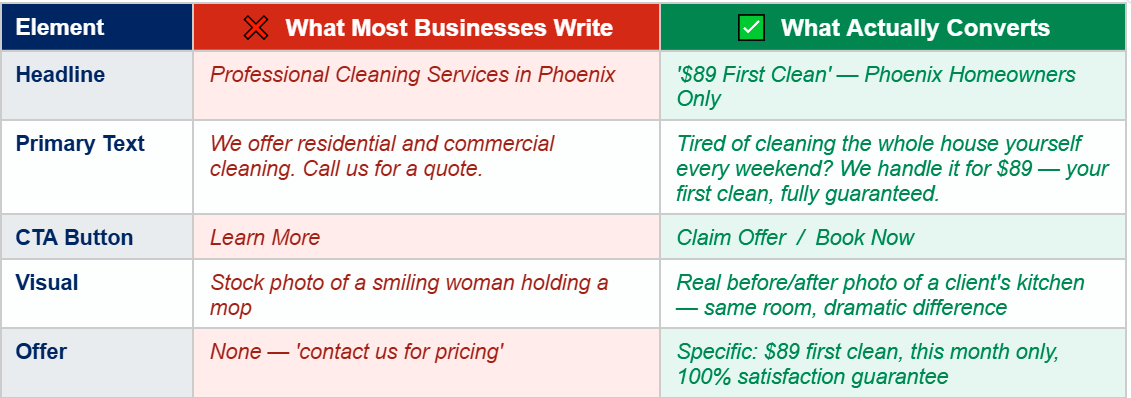
The weak version tells people what the business does. The strong version speaks to a specific problem the customer has, offers a specific solution at a specific price, and gives them a reason to act today rather than 'sometime soon.' The difference in conversion rate between these two approaches is typically 3–8x.
One of the most common mistakes in Facebook ad copy is writing for yourself instead of your customer. 'We have 10 years of experience and are fully licensed and insured' is about you. 'Your house will be spotless or we come back for free' is about your customer. Every line of your ad should answer the customer's implicit question: 'What's in it for me?' If it doesn't, rewrite it.
When we rebuild failing Facebook Ad campaigns at AheadTech360, the creative and offer are almost always the first things we change — before adjusting targeting, before changing budgets, before touching campaign structure. A great offer shown to a mediocre audience will outperform a mediocre offer shown to a perfect audience almost every time. Fix the message before fixing the mechanics.
Facebook Ads failing is almost never about the platform — it's about the setup. The eight problems in this guide account for the vast majority of underperforming campaigns we see when auditing new client accounts. Most can be fixed in a single afternoon with the right knowledge.
Start with the learning phase — make sure your campaign has had enough time and budget to stabilize before drawing conclusions. Then work through the checklist systematically: audience size, creative quality, offer strength, campaign objective, budget adequacy, retargeting setup, landing page match, and campaign stability.
Facebook Ads doesn't fail businesses. Setup mistakes, impatience, and unrealistic timelines fail businesses. The platform itself — used correctly — is one of the most powerful and cost-effective customer acquisition tools available to a small business in 2026.
The campaign isn't broken. It's telling you something. Learn to listen.